When I accessed my blog (until last week) my menu had the last item “visit site” which I always did because I could see who looked at my blog with their icons. Now that item is no longer on the menu. I can’t see my blog even when I tried following myself in email. I can read the blog but no icons as to who read or looked at all. This is very frustrating because I can’t see how my blog is doing. I asked WP for help and this is their reply:
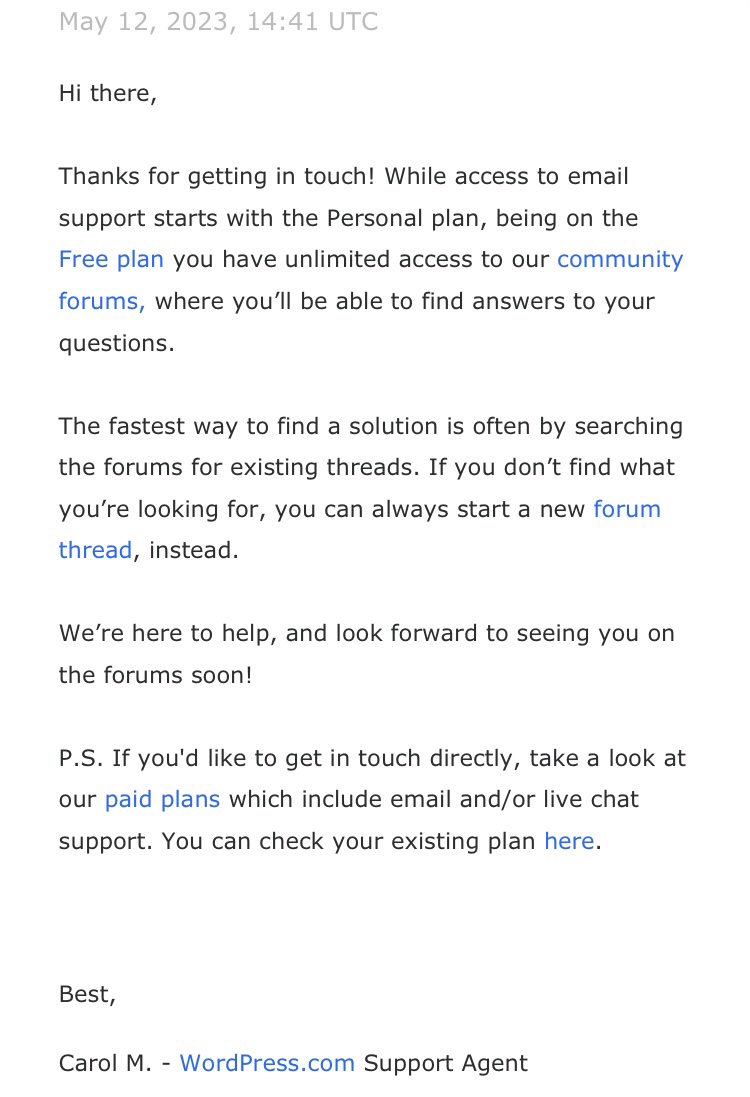
Apparently on the “free plan” I receive no help from them at all. But if I Pay them they will gladly help.😡Thanks for nothing, WP! If they can change my menu at their will and discretion, they should be able to change it back, right? And why are they messing with my menu anyway?😡
 The Bag Lady
Sorry this is happening! Did you get it fixed? You can look at your stats in the jet pack app on the Ipad?
LikeLiked by 1 person
I can see my actual post and reactions/icons of visitors if I use a browser, whereas before I could just click on View Site on menu. Why they kept changing things I have no idea. It is bad enough to have posts broken up by at least nine obnoxious, sometimes sickening ads 🙄
LikeLiked by 1 person
That is a pain really bad if you ask me
LikeLiked by 1 person
Yes it is a pita😂
LikeLike
Speaking of WP glitches, is anyone else having their “likes” disappear? I’ll read a post, click “like,” and see my gravatar appear… but when I come back later it has disappeared. It’s really irritating.
LikeLiked by 1 person
Yes!
LikeLiked by 1 person
Do you have an icon on the top left with “my sites” next to it. If so that should take you to the admin pages.
LikeLiked by 1 person
For a number of days, I had no way to establish tags on my blog..I do have a paid plan and contacted them for help, but no one was available. They said they’d email, but never did. After a number of days, the tag section showed up but in an entirely different place where it has remained. I think perhaps they’ve been working on their site, so perhaps your blog will straighten out. Fingers crossed.
LikeLiked by 1 person
Certainly looks like they are ‘upgrading’ aka fixing what ain’t broke. Contacting them is a joke. Normally things sort themselves out after a day or two. It’s always the tag section or is that just me?
LikeLike
The same happened to you? Ordinarily, I click on the help button and someone shows up within a few minutes, but this time, no…
LikeLiked by 2 people
This is the second time for me. Never had any other issue
LikeLiked by 1 person
Why it has changed I don’t know and I don’t see any place to add it back
LikeLike
Have you posed the question on the forum? Does no one else have the problem?
LikeLiked by 1 person
Not yet😏
LikeLike
type your blog address in the browser on your computer or phone and add this: /wp-admin/edit.php
That should take you to a list of your blogs and if you hit If you hit “view” under the name of the blog, you can view it. Or, If you click on the edit function ..either classic editor or block editor, depending on which you use, you should be able to edit it. You may already be doing this, but just in case.
LikeLiked by 1 person
I have done that, it just is much easier to click on view site. They changed my items on the menu I’ve had forever and I’m using the block editor since it cam on to use. I didn’t think it made much difference and was getting tired of the change notification pop up 😀
LikeLike
Oh no! This is very rude of them.
LikeLike
I pay for a professional site, WP change things whether you pay or not.
LikeLiked by 2 people
Right, irritating to me.🤨
LikeLiked by 1 person
They seem to make change willy nilly, sometimes letting us know, but more often, not. As Paula said, it’s very annoying.
LikeLiked by 1 person
Yes
LikeLike
Annoying 😡
LikeLiked by 1 person